 Piktures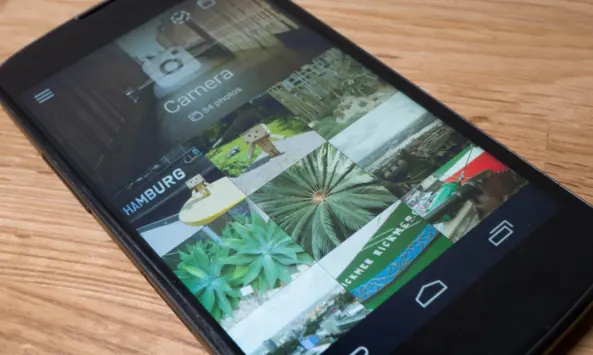
Techgedöns
Piktures für Android: Schicke Galerie-App für eure Fotosammlungen
2014-11-24 · German · Blog post
In diesem Praxisbericht vom November 2014 schreibt Marcel von Techgedöns, dass das kostenlose Piktures sofort ins Auge fiel und im Gebrauch immer mehr überzeugte – anders als die vorinstallierte Galerie, Googles Fotos-App und die Galerien der Hersteller. Marcel bescheinigt der App ein klares, schlichtes Aussehen und eine Handvoll nützlicher Funktionen. Das linke Seitenmenü listet alle Alben auf und erlaubt es, sie neu anzuordnen oder einzelne auszublenden; jedes Album öffnet sich mit einem großen, austauschbaren Titelbild über den nach Datum geordneten Fotos und Videos. Eine Kalender-Schaltfläche zeigt alle Fotos in einer Monatsansicht. Diese Ansicht gefällt Marcel am besten, vor allem für alle, die unterwegs viele Schnappschüsse machen. Ein rechtes Menü wechselt zwischen Fotos und Videos oder zeigt nur Bilder von einem bestimmten Ort, sofern sie Geotags enthalten. Fotos lassen sich in bestehende oder neue Alben kopieren oder verschieben. Der Beitrag merkt an, dass die App keine eigenen Bearbeitungswerkzeuge mitbringt, zählt sie aber dennoch zu den besseren Galerien für Android und hebt hervor, wie übersichtlich sie Fotos präsentiert. Die In-App-Käufe seien lediglich optionale Spenden, da alle Funktionen kostenlos sind.
English translation
In this November 2014 German hands-on, Techgedöns author Marcel says the free Piktures caught their eye right away and kept winning them over with use, where the stock gallery, Google's Photos app and manufacturer galleries had not. Marcel credits it with a clean, simple look and a handful of useful features. The left side menu lists every album and lets users reorder them or hide specific ones, and each album opens with a large header image that can be changed, above its photos and videos in date order. A calendar button shows all photos arranged within a monthly view, which the author likes most, especially for people who take many snapshots while out. A right-hand menu switches between photos and videos or shows only pictures from a given place, provided they carry geotags. Photos can be copied or moved into existing or new albums. The author notes that the app has no editing tools of its own but still counts it among the better Android galleries, singling out how clearly it presents photos. They explain that the in-app purchases are only optional donations, since every feature is free.